
Welcome to 2026, the year where the conversation around Artificial Intelligence has shifted fundamentally. We are no longer just chatting with LLMs; we are delegating our workflows to independent AI systems. If 2023 was the year of the chatbot, 2026 is officially the year of the “Do-er.” Systems like OpenAI’s Operator and Google’s Jarvis have moved past simple text generation to actually clicking buttons, navigating websites, and completing multi-step workflows on your behalf.
Table of Contents
- ●What Are Autonomous AI Agents? Understanding the 2026 Landscape
- ●The Heavy Hitters: Comparing Top AI Agents in 2026
- ●Step-by-Step Tutorial: How to Set Up Your First Autonomous Workflow
- ●Step 1: Define the Sandbox Environment
- ●Step 2: Connect Your ‘Tools’ and Permissions
- ●Step 3: Crafting the “Action Prompt”
- ●Step 4: Monitoring and Intervening
- ●Common Pitfalls and How to Avoid Them
- ●Beyond Productivity: Building with Agentic Tech
- ●The Verdict: Is It Ready for Prime Time?
- ●Frequently Asked Questions
- ●Conclusion: Embracing the Agentic Future
Today, the main challenge isn’t a lack of tools, but rather understanding how to use autonomous AI agents effectively without compromising security or wasting compute credits. In this comprehensive guide, we will break down the mechanics of Large Action Models (LAMs), explore the top platforms currently dominating the market, and provide a step-by-step tutorial on building your first automated workflow.
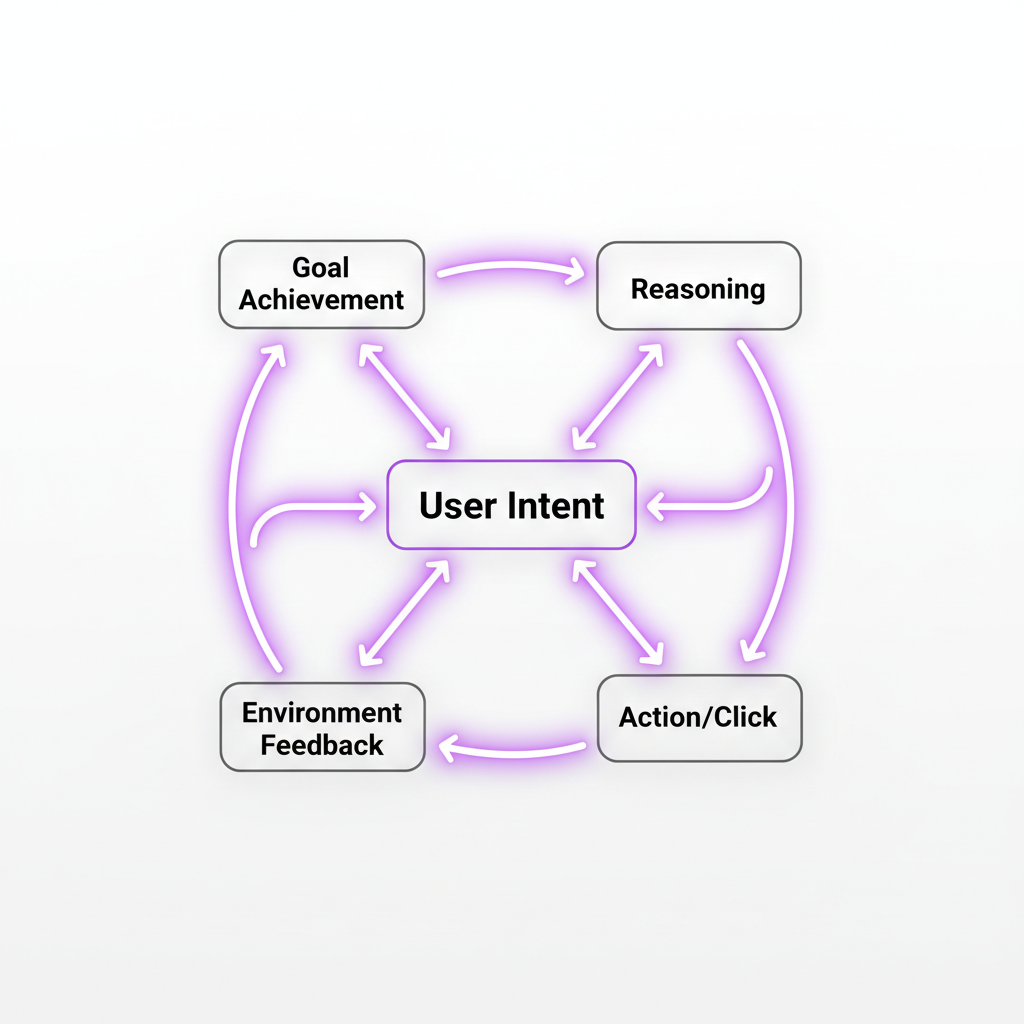
An autonomous agent differs from a standard AI because it possesses agency. It can perceive its environment (your browser or OS), reason about a goal, and take iterative actions until the goal is met. You don’t just ask it to write an email; you ask it to ‘find the best-reviewed local plumber, check their availability for Tuesday, and draft a booking request.’

What Are Autonomous AI Agents? Understanding the 2026 Landscape
In the current tech ecosystem, an agentic AI is a software entity powered by an LLM that is equipped with specialized tools to interact with the digital world. These systems utilize a loop often referred to as Reasoning and Acting (ReAct).
- Perception: The agent ‘sees’ your screen via vision models or DOM (Document Object Model) parsing.
- Planning: It breaks your complex request into a sequence of logical sub-tasks.
- Execution: It uses ‘tool-calling’ to click, type, scroll, or execute code.
- Reflection: It checks if the action worked and corrects course if it hits a CAPTCHA or an error.
By leveraging our Features page, you can see how integrated these systems have become. We are moving toward a world where your browser is no longer a tool you use, but an environment your agent manages for you.
The Heavy Hitters: Comparing Top AI Agents in 2026
Choosing the right assistant depends on your specific needs. Are you looking to automate browser tasks, or do you need something that can control your entire operating system? Here is a breakdown of the leading technologies.
| Agent Name | Developer | Primary Use Case | Platform | Key Strength |
|---|---|---|---|---|
| Operator | OpenAI | Browser Automation | Web/Chrome | Highest reasoning & safety |
| Jarvis | Deep Ecosystem Integration | ChromeOS/Android | Lightning-fast execution | |
| Computer Use | Anthropic | OS-Level Control | Linux/Desktop | Raw technical capability |
| Devin 2.0 | Cognition | Software Engineering | Cloud IDE | Fully autonomous coding |
In early 2026, OpenAI’s Operator achieved a 94% success rate on the ‘WebShop’ benchmark, outperforming humans in finding the best deals across 1,000+ obscure e-commerce sites.
Step-by-Step Tutorial: How to Set Up Your First Autonomous Workflow
If you are ready to stop typing and start delegating, follow this step-by-step guide to setting up a workflow using a standardized framework like MultiOn or OpenAI Operator.
Step 1: Define the Sandbox Environment
Never let an automated program run wild on your primary banking or sensitive accounts without supervision. Most 2026 platforms allow you to create a “Sandbox Browser Profile.” This keeps your main cookies and passwords separate from the agent’s workspace.
Step 2: Connect Your ‘Tools’ and Permissions
For an assistant to book a flight, it needs access to your calendar and a payment method. Use Virtual Credit Cards (like Privacy.com) to set spending limits. In your settings, enable the following permissions:
- Read/Write Access to Browser Tabs
- Keyboard and Mouse Emulation
- API Access to Google Workspace/Microsoft 365
Step 3: Crafting the “Action Prompt”
The secret to success is specificity. Avoid vague commands. Instead of saying “Plan a trip,” use a structured prompt.
Prompt: “Agent, navigate to Expedia and find a round-trip flight from New York to London for the dates Oct 12-19. Priority: Shortest duration. If the price is under $900, proceed to the checkout page and stop. Do NOT click ‘Purchase’—I will review the final screen.”
Step 4: Monitoring and Intervening
Watch the process in real-time. In 2026, most tools provide a “Thinking Stream”—a live text feed explaining why it’s clicking a specific button. If the workflow gets stuck in a loop (e.g., clicking the same cookie banner repeatedly), use the ‘Manual Override’ toggle to clear the path.
Common Pitfalls and How to Avoid Them
Despite their brilliance, these automated workflows are not perfect. Here are the three most common errors users encounter in 2026:
- Hallucinated Elements: The system thinks a button exists because of its training data, but the website UI has changed. Fix: Refresh the DOM cache.
- Rate Limiting: Acting too fast triggers bot-detection on websites. Fix: Set the execution speed to ‘Human-Emulation’ mode.
- Recursive Logic Loops: The program tries to solve a problem by repeating a failing action. Fix: Implement a ‘Max Steps’ limit (e.g., stop after 20 actions).
Pros of AI Agents
- Unmatched productivity for repetitive tasks.
- Ability to work 24/7 without fatigue.
- Handles complex multi-tab research effortlessly.
- Reduces human error in data entry.
Cons of AI Agents
- High token/credit consumption.
- Privacy risks if given OS-level access.
- Requires high-quality prompting to be effective.
- Potential for ‘agentic drift’ on long tasks.
Beyond Productivity: Building with Agentic Tech
For those interested in the technical side, 2026 has made it incredibly easy to build with AI. You no longer need to write complex Selenium scripts. Frameworks like LangGraph and CrewAI allow you to orchestrate multiple tools that talk to each other.
Imagine a ‘Researcher Agent’ that gathers data, sends it to a ‘Writer Agent,’ who then passes the draft to a ‘Publishing Agent.’ This entire pipeline can be built in under an hour using low-code platforms. If you’re interested in joining our team of developers, visit our About page to see what we’re working on.
The Verdict: Is It Ready for Prime Time?
Self-directed AI tools are no longer a laboratory experiment. In 2026, they are the defining interface for the internet. While caution is required—specifically regarding data privacy—the time saved is undeniable. We recommend starting with browser-based orchestration for low-risk tasks like data scraping or travel research before moving to OS-level automation.
Frequently Asked Questions
Conclusion: Embracing the Agentic Future
The shift toward agentic technology represents a monumental change in how we interact with the digital world. We are moving from an era of manual input to one of high-level intent. By mastering how to use autonomous AI agents today, you position yourself at the absolute forefront of this next industrial revolution.
Stay updated with the latest breakthroughs by following our updates. If you have questions about specific configurations or want to report a bug in a tool we reviewed, please visit our Contact page. The future is autonomous—are you ready?
Get Started with OpenAI Operator Today

Written by Mangaleswaran
Mangaleswaran is the founder of AIZnap (aiznap.com) and a dedicated AI content creator. With a background in blogging and technology, he has a deep passion for making artificial intelligence accessible to everyone. He specializes in breaking down complex AI tools, tutorials, and updates into simple, practical guides that anyone can follow. Whether you are a complete beginner or someone looking to use AI to build websites, apps, or grow your online presence — Mangaleswaran's content is designed to help you take action with confidence.
View all posts