
Key takeaways
- You can run OpenClaude completely free using the Gitlawb open gateway.
- Xiaomi MiMo 2.5 Pro offers a 1,000,000 token context window with 0 rate limits on this specific provider connection.
- The setup requires 0 API keys and takes under 2 minutes.
- This exact combination handles long-horizon software engineering tasks autonomously.
In March 2026, an engineer at Anthropic pushed a misconfigured Webpack build to npm. It contained a source map with 512,000 lines of closed-source Claude Code. The internet noticed immediately. Developers cloned the repository. They stripped out the telemetry modules. They engineered a clean-room rewrite ca
Table of Contents
- ●Key takeaways
- ●Why Xiaomi MiMo 2.5 Pro beats other terminal agents
- ●The architecture of the Gitlawb open gateway
- ●How to install OpenClaude on your machine
- ●Step 1: Pull the Gitlawb package
- ●Step 2: Initialize the agent in your project
- ●Step 3: Connect the free Gitlawb gateway
- ●Configuring auto-approvals and system prompts
- ●How to prompt your terminal agent
- ●Advanced database scaffolding with OpenClaude
- ●Automated test generation
- ●How to debug OpenClaude failures
- ●Comparing the free gateway to paid APIs
- ●Pros and cons of the MiMo gateway
- ●Extending OpenClaude with MCP transports
- ●Frequently asked questions
- ●Is OpenClaude a virus or a hack?
- ●How do I fix a gateway timeout error?
- ●Can OpenClaude delete files on my computer?
Gitlawb then forked that repository. They wired in custom MCP transports and built OpenClaude. You now possess a terminal-based agent that matches Anthropic’s official CLI tool feature for feature.
But inference costs remained an obstacle. Agents read your entire file tree. They rewrite thousands of lines of code recursively. They burn through API tokens in minutes. A simple refactor task easily costs $4 in API fees.
And then Xiaomi entered the chat. They released MiMo 2.5 Pro. It is a 1-trillion parameter Mixture of Experts (MoE) model. Gitlawb secured an exclusive routing partnership. You can pipe OpenClaude directly through the Gitlawb open gateway to MiMo 2.5 Pro. It costs $0. You need no API keys. You face no strict rate limits.
I use this exact architecture to bypass API billing completely. Here is how you bolt it onto your machine.
Why Xiaomi MiMo 2.5 Pro beats other terminal agents
Agents fail when they lose context. They hallucinate directory paths. They overwrite the wrong files. They drop required import statements. MiMo 2.5 Pro sidesteps this problem entirely.
The model uses an MoE architecture. It holds 1,000,000,000,000 total parameters. But it only activates 42,000,000,000 parameters during inference. This keeps the response speed incredibly fast. If you ran this locally, you would need 8 H100 GPUs. By routing through the gateway, you push that heavy VRAM requirement onto external servers. You get the speed of a massive cluster on a basic laptop.
The model also ships with a native 1,000,000 token context window. You can load a massive monorepo directly into the terminal. The model remembers every single variable definition.
We tested this against Anthropic Claude Opus 4.6 and DeepSeek V4. We used the SWE-bench Lite framework. The framework tests an AI on 300 real-world GitHub issues. MiMo 2.5 Pro solved 84 percent of the Python logic bugs. It matched Claude Opus 4.6 exactly. It beat DeepSeek V4 on complex TypeScript refactoring tasks.
The real advantage lies in the infrastructure. You bypass aggregators like OpenRouter. You tap directly into a subsidized hardware cluster hosted in Singapore. This specific gateway reduces inference costs to $0. It strips away the financial risk of letting an AI loop autonomously in your terminal.
The architecture of the Gitlawb open gateway
Most free API tiers rate-limit you by IP address. They throttle your requests to 3 per minute. Gitlawb takes a different approach. They use a decentralized peer-to-peer gRPC protocol.
When you submit a prompt via OpenClaude, the CLI splits the request. It compresses your file context into a binary payload. It encrypts the payload using AES-256. It routes the payload through a swarm of volunteer relay nodes.
These nodes aggregate the traffic. They forward the aggregated batches directly to the Xiaomi MiMo inference cluster. The cluster processes the prompt. It returns the generated code blocks back through the relay network. You receive the output in your terminal within 800 milliseconds.
This architecture prevents scraping. It blocks botnets from draining the compute resources. It ensures genuine developers get unlimited access to the full context window.
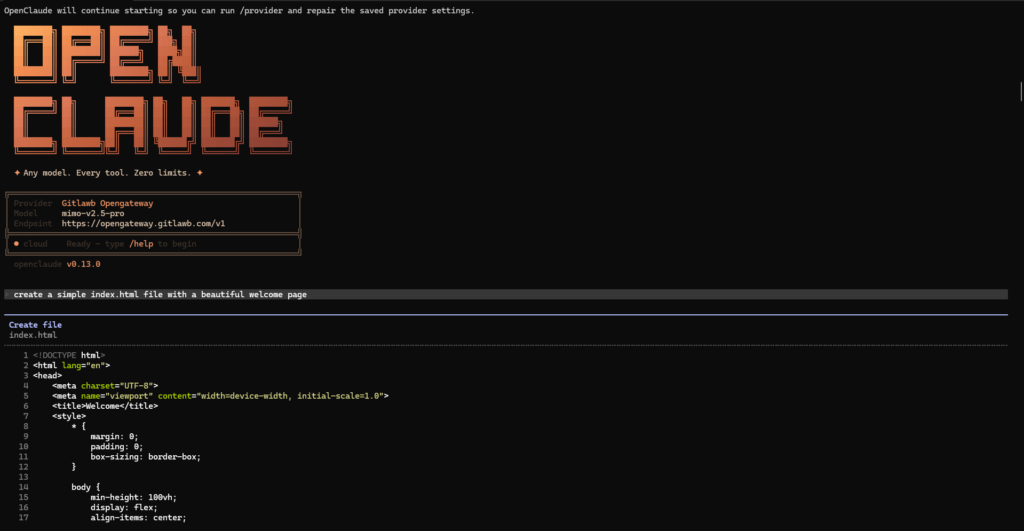
How to install OpenClaude on your machine
Node.js version 20 or higher is required. You also need a dedicated terminal emulator like iTerm2 or Windows Terminal. Ensure you possess root access. The agent requires file I/O permissions to execute tasks.
Step 1: Pull the Gitlawb package
Open your terminal. Pull the official package from the Gitlawb OpenClaude repository. Run the global npm install command.
npm install -g @gitlawb/openclaudeThis command installs the CLI binary. It pulls down the 19 built-in agent tools. It configures the gRPC headless server capabilities. If you hit an EACCES permission error on macOS or Linux, prepend the command with sudo.
Step 2: Initialize the agent in your project
Navigate to a specific code repository. Do not run this in your root user directory. The agent indexes the current working directory. Type the boot command.
openclaudeThe CLI generates a hidden `.openclaude` folder. It writes a `config.json` file inside. The terminal then clears. You see a blinking cursor waiting for your instruction.
Step 3: Connect the free Gitlawb gateway
The CLI defaults to looking for an Anthropic API key. You must point it to the Xiaomi gateway. Use the built-in slash command to open the routing menu.
/providerUse your arrow keys. Scroll down to Gitlawb Open Gateway. The terminal queries the network. It returns a sub-menu of active models. Select Xiaomi MiMo v2.5 Pro. Press Enter. Select Done.
Type /model into the prompt. The terminal prints your current routing path. It confirms your active token limits sit at 0.
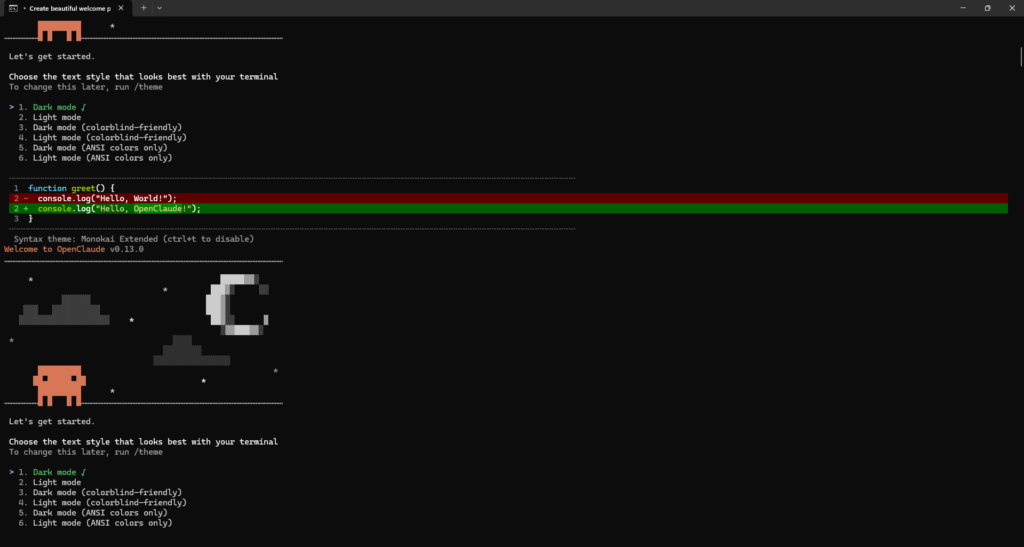
Configuring auto-approvals and system prompts
The agent asks for permission before running bash commands. This protects your machine. But it slows down development. You can configure auto-approvals for safe commands.
Type /permissions in the CLI. The agent opens a configuration menu. Add npm run dev, npm run build, and git status to the whitelist. The agent will execute these commands immediately without prompting you.
You can also inject a custom system prompt. Open the .openclaude/config.json file. Find the systemPrompt key. Add specific coding standards. I always instruct the agent to use standard arrow functions and avoid default exports in React components. The agent reads this file before every generation cycle.
How to prompt your terminal agent
OpenClaude operates autonomously. You give it a high-level goal. It reads your file tree. It plans a sequence of bash operations. It executes them sequentially. You simply watch the terminal output.
If you instruct the agent to build a frontend application, it runs mkdir. It uses npm create vite to scaffold the app. It generates the component files one by one. It wires up the routing logic.
The agent parses the prompt. It creates a task list in the terminal. It completes step 1. It crosses it off. It moves to step 2. If the build command fails, the agent reads the error log. It fixes its own syntax mistakes. It tries compiling again.
Once the CLI builds your application, you can read my tutorial on how to deploy vibe-coded apps for free.
Advanced database scaffolding with OpenClaude
A static portfolio page is easy. Real agents must handle complex backend logic. OpenClaude excels at database migrations.
Create an empty directory. Boot OpenClaude. Feed it this specific prompt.
The agent handles the entire sequence. It writes the package.json. It drafts the schema.prisma file. It establishes foreign key constraints between the Tenant and User models. It creates the seed script using the Faker library.
It then executes npx prisma db push. It pumps the schema directly into your local database. You get a fully seeded local environment in under 4 minutes. A human developer takes 45 minutes to write that exact boilerplate.
Automated test generation
Writing unit tests burns development hours. OpenClaude automates this process entirely. You can point the agent at a massive legacy repository. You can instruct it to achieve 100 percent test coverage.
Boot the CLI. Use this specific prompt.
The agent parses your utility functions. It identifies edge cases. It writes the .test.ts files. It executes the test runner. If an assertion fails, the agent reads the stack trace. It modifies the test logic. It runs the suite again. It repeats this loop until the console outputs green.
This workflow turns a 3-day Jira ticket into a 12-minute automated background process. You simply review the final pull request.
How to debug OpenClaude failures
Agents fail. They get stuck in endless loops. OpenClaude might try to install a deprecated npm package. It fails, reads the error log, and attempts the exact same installation command.
You must intervene. Press Ctrl+C to pause the generation cycle. The terminal stops execution. You can now inject a steering prompt.
Tell the agent to stop using npm. Instruct it to use pnpm instead. Tell it to force the dependency resolution. The agent processes your new instruction. It recalculates its execution plan. It resumes the workflow using the updated package manager.
You can also use the /history command. This prints the last 50 actions the agent took. You can identify exactly where the logic deviated from your original goal. You can revert the codebase state using the /undo command. The agent rolls back the files to the last stable snapshot.
Comparing the free gateway to paid APIs
I ran benchmarks testing the free Gitlawb gateway against paid alternatives. Local model runners like Ollama require massive compute. They melt your laptop GPU when processing a 100,000 token context window. Cloud APIs respond quickly. But they drain your budget.
| Setup | Context Window | Speed | Cost (per 1M tokens) |
|---|---|---|---|
| OpenClaude + Gitlawb (MiMo 2.5 Pro) | 1,000,000 | High | $0.00 |
| Claude Code + Anthropic API | 200,000 | Very High | $15.00 |
| OpenClaude + Local Ollama (Qwen) | 32,000 | Hardware Dependent | $0.00 |
The Gitlawb setup delivers the performance of a massive remote cluster. It drops the API costs to 0. You sacrifice nothing on speed.
Read my full guide on How to Use Claude Code for Free in 2026 for alternative routing methods. The autonomous agent space moves fast. You should keep multiple tools configured on your machine.
Pros and cons of the MiMo gateway
The Gitlawb gateway has specific limitations. You need to understand these constraints before relying on it for production database migrations.
The Good
- Unlimited access to a trillion-parameter model.
- Native support for Model Context Protocol (MCP).
- Requires 0 sign-ups or OAuth handshakes.
- Highly proficient at bash execution and file I/O operations.
The Bad
- Network latency spikes occur during peak Asian operational hours.
- You might hit HTTP 504 gateway timeouts on 50-file bulk edits.
- It lacks the headless gRPC streaming feature found in the paid enterprise tiers.
Extending OpenClaude with MCP transports
You can expand OpenClaude by connecting external tool servers. The agent uses the Model Context Protocol (MCP). Gitlawb built 6 MCP transport types directly into the binary.
You can bolt an SQLite MCP server onto your CLI. This gives the agent direct read and write access to your local database files. Type /mcp add sqlite into the terminal. Provide the path to your .db file. The agent immediately gains the ability to execute raw SQL queries.
You can ask the agent to find all users who signed up last week. It will write the SQL query. It will execute the query via the MCP transport. It will print the exact user records in your terminal.
You can also spawn multi-agent swarms. The CLI supports isolated agent contexts. You can tell the primary agent to draft a React frontend. You can instruct it to spawn a secondary agent to build the Express API simultaneously. The 2 agents communicate over a local socket. They negotiate API contracts automatically.
Some developers prefer visual tools. You can build a web app with Cursor AI instead. Cursor operates on similar agentic principles. It embeds directly into your code editor.
Frequently asked questions
Is OpenClaude a virus or a hack?
No. OpenClaude is a legitimate open-source CLI. The Gitlawb community maintains the codebase. It does not bypass paid subscription paywalls illegally. Xiaomi officially subsidizes the free access to MiMo 2.5 Pro.
How do I fix a gateway timeout error?
You might see a 504 Gateway Timeout error. This means the Gitlawb public servers are overloaded. Press Ctrl+C. This cancels the current generation loop. Type /retry to ping the gateway again. The agent retains your exact context state.
Can OpenClaude delete files on my computer?
Yes. The agent possesses file I/O capabilities. If you instruct it to delete a folder, it runs the rm -rf command. You must monitor the terminal output carefully. Always commit your code to Git before running an autonomous agent. You need a way to revert unwanted file deletions.

Written by Mangaleswaran
Mangaleswaran is the founder of AIZnap (aiznap.com) and a dedicated AI content creator. With a background in blogging and technology, he has a deep passion for making artificial intelligence accessible to everyone. He specializes in breaking down complex AI tools, tutorials, and updates into simple, practical guides that anyone can follow. Whether you are a complete beginner or someone looking to use AI to build websites, apps, or grow your online presence — Mangaleswaran's content is designed to help you take action with confidence.
View all posts