
Google just dropped a massive payload of AI updates for 2026. We got Gemini Omni, Gemini Spark, and the highly anticipated Gemini 3.5 Flash. The real story is Antigravity 2.0. You write software. You want the AI to write it for you. This update shifts the mechanics of vibe coding.
Table of Contents
- ●The Antigravity 2.0 IDE confusion (and how to fix it)
- ●Setting up the full IDE environment
- ●Understanding the RAG integration inside Antigravity
- ●Gemini 3.5 Flash benchmarks
- ●Writing the perfect PRD for AI code generation
- ●Advanced context caching mechanics
- ●Project 1: Building a digital agency website
- ●Step 1: Writing the PRD
- ●Step 2: Generation and output
- ●Project 2: Building a Flutter mobile app
- ●Step 1: Project initialization
- ●Step 2: Targeting main.dart
- ●Step 3: Compiling and testing
- ●Step 4: Refactoring into multiple files
- ●Handling package dependency errors
- ●Pros and cons of the new setup
- ●The vibe coding reality
- ●Key takeaways
- ●Frequently asked questions
- ●Is Antigravity IDE free to use?
- ●How do I fix the Antigravity Agent Mode issue?
- ●Can Gemini 3.5 Flash connect to GitHub?
- ●What is the difference between Gemini Flash and Gemini Omni?
- ●Start building now
Vibe coding is the process of acting as the director while the AI handles the syntax. You feed it a Product Requirements Document (PRD). The AI agents scaffold the entire codebase. They wire up the package.json file. They configure the YAML dependencies automatically. Antigravity 2.0 pairs directly with Gemini 3.5 Flash to make this happen in minutes.
We are going to build 2 things. First, an animated agency landing page. Second, a functional Flutter application for meeting reminders. Anyone can follow along. You just need the right setup.
The Antigravity 2.0 IDE confusion (and how to fix it)
Google shipped the Antigravity update with a massive catch. You probably clicked “update” on your existing installation. You noticed the interface shrank. The full IDE vanished. Users received a stripped-down Agent Mode interface resembling a basic chat box.
Agent Mode blocks extension installations. It hides line-by-line code reviews. Google built this lightweight version for casual users who chat with text files. Developers require the full IDE experience.
If you open Antigravity and only see the Agent Mode, you must perform a clean wipe. Go to the official Google AI platform and download the specific Antigravity IDE setup file (Windows 64-bit or Mac ARM). Use a deep registry cleaner like Geek Uninstaller to rip out the old system files. Delete the AppData/Roaming/Antigravity folder manually. The system keeps forcing you back into Agent Mode until you scrub these files.
Setting up the full IDE environment
Run the correct setup file. Select “Continue with Google” to authenticate your account upon launching. The new IDE imports your existing Visual Studio Code extensions automatically. You can pull in your themes, keybindings, and snippets.
Select the Dark Modern theme. Accept the recommended connection settings. Finalize the setup. You now have access to the model selector. Switch the engine to Gemini 3.5 Flash.
You must also generate an API key from Google AI Studio. Paste that key into the Antigravity settings under Workspace Configurations. Flash requires an active token to hit the 2-million context window. Read our guide on how to build and deploy a Google AI Studio website for free to compare alternative web setups.

Understanding the RAG integration inside Antigravity
Antigravity uses Retrieval-Augmented Generation to map your codebase. It scans your local files upon opening a folder. It builds a vector index of every function and variable.
The vector search algorithm calculates cosine similarity between your prompt and the local files. It extracts only the relevant functions. You save context space. You reduce API costs.
When you prompt the composer, it searches that index first. It pulls the relevant code blocks into the context window. It feeds those specific chunks directly to Gemini 3.5 Flash.
This prevents the AI from hallucinating variable names. It knows exactly how your database schema looks because it reads the actual Prisma files. It sees your custom color variables in your CSS stylesheet. It bolts those exact hex codes onto the new components it generates. You get an integrated output instantly.
Gemini 3.5 Flash benchmarks
Look at the raw terminal benchmarks for coding before we build. Google specifically tuned Gemini 3.5 Flash for agentic workflows and long-context code generation. It ingests entire GitHub repositories in 3 seconds.
Based on the latest data visualization from independent testing, Gemini 3.5 Flash secures the number 2 spot in terminal coding performance. It sits directly behind OpenAI’s ChatGPT 5.5 on the SWE-bench evaluation.
| AI Model | Coding Benchmark Rank | Key Strength | Speed Profile |
|---|---|---|---|
| ChatGPT 5.5 | 1 | Complex Logic & Reasoning | Moderate |
| Gemini 3.5 Flash | 2 | Vibe Coding & Context Length | Extremely Fast |
| Claude 3.5 Sonnet | 3 | UI/UX Layout Generation | Fast |
Gemini 3.5 Flash shines in speed. It clocks in at roughly 180 tokens per second. It writes massive blocks of functional code without stopping to think for 40 seconds. Flash follows directions strictly. It respects constraints. It bolts on the exact UI components you request.
Writing the perfect PRD for AI code generation
To get 3000 lines of perfect code, you need a highly structured PRD. A 2-sentence prompt yields a generic layout. A 10-page PRD yields a complete SaaS platform.
A weak PRD forces the AI to guess your intentions. It guesses wrong. It builds a sloppy architecture. Write out the exact data flow diagram in plain text. Specify which components share state.
Break your PRD into 4 strict categories. Define the core functionality first. Explain exactly what the application does. Detail the user journey step-by-step.
Outline the tech stack next. Specify the language, the framework, and the exact version numbers. State Next.js 15 if you need server actions. Demand vanilla CSS if you want to avoid Tailwind.
List the data structures clearly. Outline the database schema. Define the API endpoints. Tell the AI exactly how the tables connect.
Set the design system constraints. Give the AI specific hex codes for your primary and secondary colors. Name the Google Fonts you want it to import. Provide exact border-radius values. The AI respects constraints. Give it a tight box to play in.
Advanced context caching mechanics
Flash introduces a massive shift in API pricing. It uses context caching for large codebases. When you upload a massive application into Antigravity, Flash reads the files. It stores that context in a temporary cache.
You pay the API cost to process those tokens once. Every subsequent prompt in that session hits the cache. You only pay a fraction of a cent for those cached tokens.
This changes how you approach refactoring entirely. You can upload an entire 50-file React project. You can ask Flash to rewrite the authentication logic across all 50 files. The model understands the entire architecture instantly. It modifies the specific components directly. You do not hit rate limits after 3 prompts.
Project 1: Building a digital agency website
We will start by generating a simple HTML and CSS landing page for a digital agency. Create a new, empty folder on your desktop. Drag and drop that folder directly into the Antigravity IDE.
Step 1: Writing the PRD
The AI needs instructions. Open the Antigravity composer. Select the Gemini 3.5 Flash model from the dropdown. Paste in a detailed prompt outlining exactly what sections the website requires. Tell it to use CSS Grid for the layout.
Create a modern agency landing page in a single HTML file using vanilla CSS and JavaScript. Use CSS Grid for the 4-column services section. Include a hero section with a 3D hover effect using transform perspective. Build a client testimonial carousel with a 3-second auto-slide timer. Add a working footer with dummy links. Use only native CSS features. Ensure all animations share a consistent cubic-bezier easing curve. The design must be fully responsive on mobile screens.
Step 2: Generation and output
Hit enter. Gemini 3.5 Flash works aggressively. Within 60 seconds, the model writes over 3000 lines of code. It maps out the DOM structure. It writes complex CSS keyframes for the animations. It injects vanilla JavaScript to manage the carousel state.
Click Accept Changes in the composer. Open the HTML file in your browser. The result is perfectly clean.
The 3D hover effects trigger correctly on mouse movement. The animations share a consistent easing curve. Flash understands aesthetic consistency and scales the fonts appropriately.
Scroll to the bottom and click the footer links. They route correctly. Flash builds proper `#` routing by default to ensure functional navigation.
Project 2: Building a Flutter mobile app
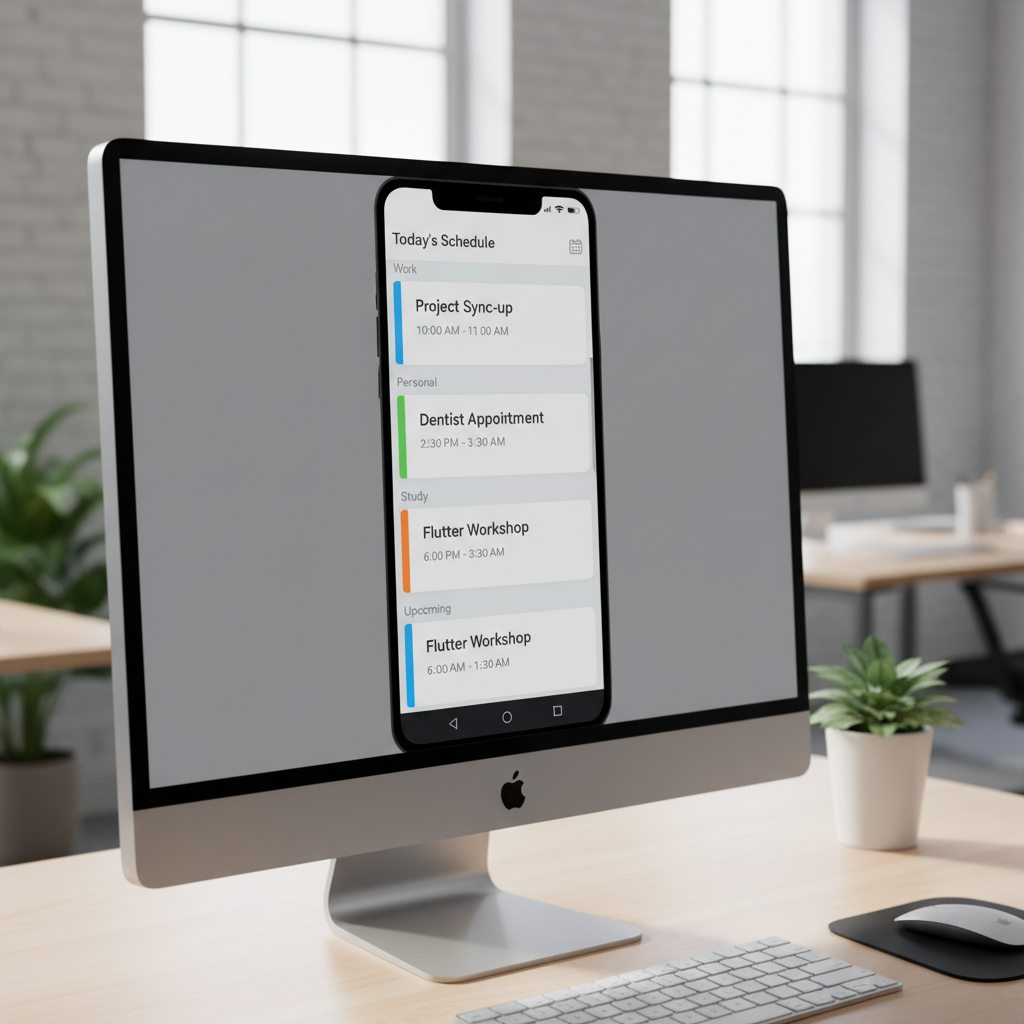
Websites are easy. Mobile applications require complex state management and strict architectural rules. We are going to build a Meeting Reminder App using Flutter.
Step 1: Project initialization
Ensure you have the Flutter SDK installed on your machine. Open a terminal. Run `flutter create meeting_app`. The system scaffolds the default counter application. Open that specific folder in Antigravity.
You need an emulator to test the output. Boot one up using Android Studio. You can also run the app directly in your desktop Chrome browser for faster testing.
Step 2: Targeting main.dart
In the Antigravity composer, you must tag the specific file you want the AI to modify. Type `@main.dart` to lock the context. This forces the model to read the current widget tree.
Paste in the PRD for the mobile app. The instructions must dictate how the data is stored and displayed. Tell the AI exactly which state management approach to use. We will use standard `setState` for this build.
Rewrite main.dart to be a Meeting Reminder application using standard setState. Include an animated splash screen on startup using a FadeTransition widget. The main screen should list upcoming meetings in a ListView.builder. Provide a floating action button to add a new meeting. The Add Meeting form needs fields for Title, Description, Date picker, Duration, Category, and a Color selector. Implement simple state management to save and display the new meetings immediately.
Step 3: Compiling and testing
Hit send. Gemini writes the Dart language implementation flawlessly. It structures the widgets. It builds the forms. It handles the state changes.
Run the app. The splash screen loads with a custom animation. It transitions directly into the main list view. Click the “+” button. The form opens immediately.
Type Client Meeting into the text field. Select the date. Choose a duration. Pick the Work category. Assign a red color tag. Hit save.
The meeting appears on the main screen instantly. The state updates without crashing. Flash wires up the TextEditingControllers perfectly. It disposes of them correctly to prevent memory leaks.
The AI handles the entire lifecycle of the data within the session memory. Read our guide on how to deploy vibe coded apps for free using Dokploy to push an application like this to the open web.
Step 4: Refactoring into multiple files
Single-file applications become unreadable fast. You need to modularize the codebase. Open the Antigravity composer and tag `@main.dart`.
Prompt the AI to split the code. Tell it to extract the MeetingForm widget into a new file called `meeting_form.dart`. Tell it to move the model class to `meeting_model.dart`.
Flash executes the split perfectly. It creates the new files in your `lib` directory. It updates the import statements in `main.dart` automatically. The app compiles. You just saved 20 minutes of manual cutting and pasting.
Handling package dependency errors
Sometimes the AI suggests a package you do not have installed. Flash might decide to use the `intl` package to format the dates. The code throws a missing dependency error.
Do not panic. Copy the exact error trace from the terminal. Paste it into the Antigravity chat. Tell Flash to fix the issue.
The model realizes the `pubspec.yaml` file is missing a dependency. It generates a terminal command like `flutter pub add intl`. Run the command. The error disappears. This feedback loop is the core mechanic of vibe coding.
Pros and cons of the new setup
Google got a lot right with this update. There are still friction points in the ecosystem. You need to know the limitations before you rely on it for production builds.
The good
- Gemini 3.5 Flash generates thousands of lines in seconds.
- The AI strictly follows PRD constraints without hallucinating features.
- Antigravity IDE successfully imports existing VS Code configurations.
- UI animations and frontend logic are highly consistent.
- Context caching reduces API costs on massive codebases.
The bad
- The default update traps users in a limited Agent Mode.
- Manual installation requires deep registry cleaning to fix.
- Usage limits on the Google Gemini API remain ambiguous for heavy users.
- The composer occasionally struggles to diff changes across more than 5 files at once.
The vibe coding reality
Writing software requires a new approach. You memorize patterns, architectures, and constraints. You operate as a systems thinker.
You design the blueprint. The AI lays the bricks. When you encounter bugs, paste the error trace directly into the Antigravity composer. Let the AI resolve the logic failure.
Explore alternatives if you prefer a different IDE. Many developers still use Cursor. We wrote a full breakdown on how to build a web app with Cursor AI to compare the workflows. Cursor relies heavily on Claude 3.5 Sonnet. Antigravity locks you into the Google ecosystem. Pick your engine and stick to it.
Key takeaways
- Gemini 3.5 Flash is exceptionally fast at writing full applications.
- Always download the Antigravity IDE directly from the website to avoid the Agent Mode trap.
- Provide highly detailed PRDs. The AI needs exact instructions regarding state management and UI requirements.
- Use `@` tagging in the composer to lock the AI context to specific files like `main.dart`.
- Verify all generated terminal commands before executing them on your machine.
Frequently asked questions
Is Antigravity IDE free to use?
Yes, the Antigravity IDE is free to download. Access to advanced models like Gemini 3.5 Flash requires specific Google Workspace tiers. You might also need active API credits depending on your usage volume.
How do I fix the Antigravity Agent Mode issue?
Completely uninstall the current application using a tool like Geek Uninstaller to wipe leftover registry files. Download the full IDE setup package directly from the product page. Delete the `AppData` folder manually to ensure a clean slate.
Can Gemini 3.5 Flash connect to GitHub?
Yes. The full Antigravity IDE supports standard GitHub integrations. You can commit, pull, and push your vibe coded projects directly to your repositories from the source control panel. The AI can even draft your commit messages based on the diffs.
What is the difference between Gemini Flash and Gemini Omni?
Gemini Flash is optimized for speed and long-context text generation. It processes millions of tokens rapidly. This makes it ideal for massive codebases. Omni is a multimodal model built for processing video, audio, and images simultaneously. Read our guide on Gemini Omni vs SeaDance 2 for a breakdown of video generation.
Start building now
A solid idea, a detailed PRD, and the right IDE get you to production. Antigravity 2.0 paired with Gemini 3.5 Flash gives you the tools to ship products today.
Set up your workspace. Write your first prompt. Watch the system compile your vision. Open the editor and start building.

Written by Mangaleswaran
Mangaleswaran is the founder of AIZnap (aiznap.com) and a dedicated AI content creator. With a background in blogging and technology, he has a deep passion for making artificial intelligence accessible to everyone. He specializes in breaking down complex AI tools, tutorials, and updates into simple, practical guides that anyone can follow. Whether you are a complete beginner or someone looking to use AI to build websites, apps, or grow your online presence — Mangaleswaran's content is designed to help you take action with confidence.
View all posts